EcoFlow Setup and Usage Guide for First-Time Owners
Welcome to EcoFlow Philippines! If you are a first-time owner of an EcoFlow device, this guide will walk you through the complete setup and usage process. Ecoflow products are designed to provide portable and reliable power solutions, whether for home, outdoor adventures, or emergency situations. By following this guide, you can maximize the efficiency and lifespan of your EcoFlow device.
- Unboxing Your EcoFlow Device
- Charging Your EcoFlow for the First Time
- Powering On and Device Overview
- Connecting Appliances to Your EcoFlow
- Using EcoFlow’s Mobile App
- Tips for Maintaining Your EcoFlow Device
- EcoFlow Safety Guidelines
- Optimizing EcoFlow for Outdoor Adventures
- Common Troubleshooting for First-Time EcoFlow Users
- EcoFlow Accessories and Expansion
- Final Thoughts for First-Time Owners
Unboxing Your EcoFlow Device
When you receive your EcoFlow product, carefully unbox all components. Inside the package, you will typically find the main EcoFlow unit, charging cables, an adapter, and the user manual. Ensure that nothing is damaged during shipping, as this will help prevent potential issues during setup. Familiarize yourself with each accessory and understand their specific purposes.
Charging Your EcoFlow for the First Time
Before using your EcoFlow device, it is essential to fully charge it. Plug the device into a compatible power outlet using the included adapter. EcoFlow devices support fast charging technology, allowing you to charge them quickly and efficiently. During the initial charge, avoid turning on heavy appliances to ensure the battery reaches full capacity without interruption.
Powering On and Device Overview
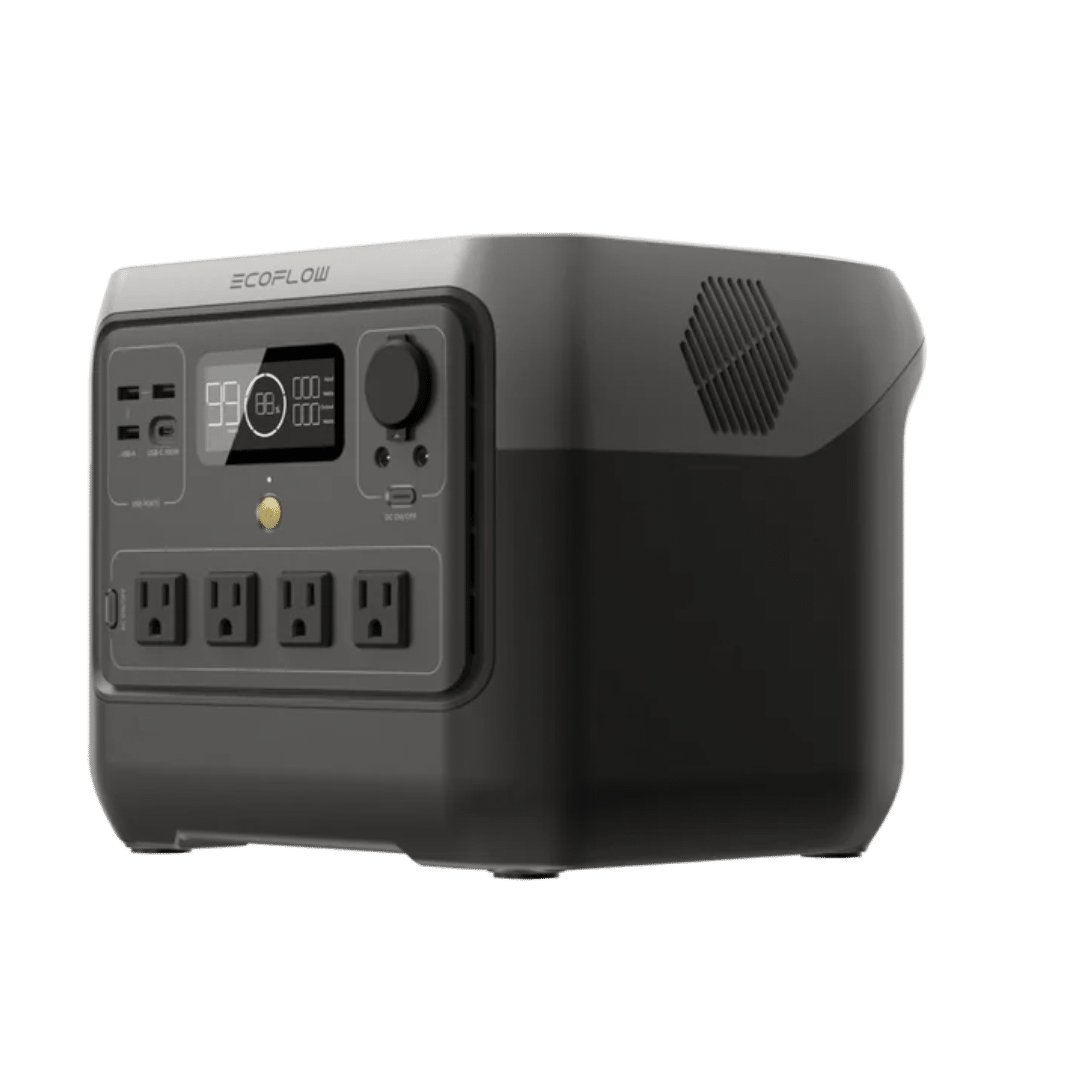
Once fully charged, power on your EcoFlow device. You will notice a display panel that provides information about battery level, output voltage, and other operational settings. Understanding this interface is critical for first-time users. EcoFlow devices are designed to be user-friendly, with intuitive buttons and clear indicators for different functions.
Connecting Appliances to Your EcoFlow
Your EcoFlow unit supports various types of appliances, from small electronics to larger devices like refrigerators. Before connecting any appliance, verify that the total power consumption does not exceed the EcoFlow’s rated output. Start with smaller devices and gradually move to larger loads to prevent overloading. Proper usage ensures your EcoFlow device remains safe and durable.
Using EcoFlow’s Mobile App
EcoFlow provides a mobile application that allows you to monitor your device remotely. The app offers real-time updates on battery status, charging progress, and energy consumption. Connecting your EcoFlow to the app is straightforward: download the app, pair it with your device, and start monitoring. This feature is especially useful for first-time owners who want to track usage patterns and manage energy efficiently.
Tips for Maintaining Your EcoFlow Device
Maintaining your EcoFlow device is essential for longevity. Avoid exposing it to extreme temperatures or moisture. Regularly clean the device using a soft, dry cloth to prevent dust accumulation. When storing your EcoFlow, ensure it is charged to at least 50% to preserve battery health. These simple practices will help ensure your device continues to operate at peak performance.
EcoFlow Safety Guidelines
Safety is paramount when using any portable power station. Do not attempt to open or modify your EcoFlow device, as this can cause severe damage or void the warranty. Always use the original EcoFlow charging accessories. Additionally, avoid placing the device near flammable materials and keep it away from children. Following these safety guidelines ensures a secure and enjoyable experience with your EcoFlow device.
Optimizing EcoFlow for Outdoor Adventures
For outdoor enthusiasts, EcoFlow provides reliable energy in remote locations. Whether camping, hiking, or tailgating, your EcoFlow device can power lights, small appliances, and communication devices. To optimize performance, use energy-efficient appliances and monitor battery levels regularly. Packing the right cables and connectors will also make your outdoor experience smoother and more enjoyable.
Common Troubleshooting for First-Time EcoFlow Users
Even with proper setup, first-time EcoFlow users may encounter minor issues. Common problems include slow charging, unexpected shutdowns, or device errors. Check all connections and ensure the device is not overloaded. Refer to the EcoFlow manual for error codes and solutions. Most issues can be resolved quickly with a few simple adjustments, allowing you to continue enjoying your EcoFlow device without interruption.
EcoFlow Accessories and Expansion
EcoFlow offers various accessories to enhance your experience, such as solar panels, extra batteries, and carrying cases. Integrating solar panels with your EcoFlow allows for renewable energy usage, ideal for long-term outdoor trips. Additional batteries expand your energy capacity, ensuring you have power when you need it most. Exploring these accessories can significantly improve your EcoFlow experience.
Final Thoughts for First-Time Owners
Owning an EcoFlow device opens up new possibilities for portable power. By following this guide, you can confidently set up and use your EcoFlow product while maximizing efficiency and safety. Remember to charge fully, monitor usage, and follow maintenance tips to ensure a long-lasting, reliable experience. EcoFlow Philippines is committed to helping you make the most of your EcoFlow device, whether at home, on the road, or in nature.
By integrating these steps and tips, first-time EcoFlow owners can enjoy a seamless and safe power experience. With proper care and understanding, your EcoFlow device will serve as a dependable energy companion for years to come.